
Which Kirby do I have?
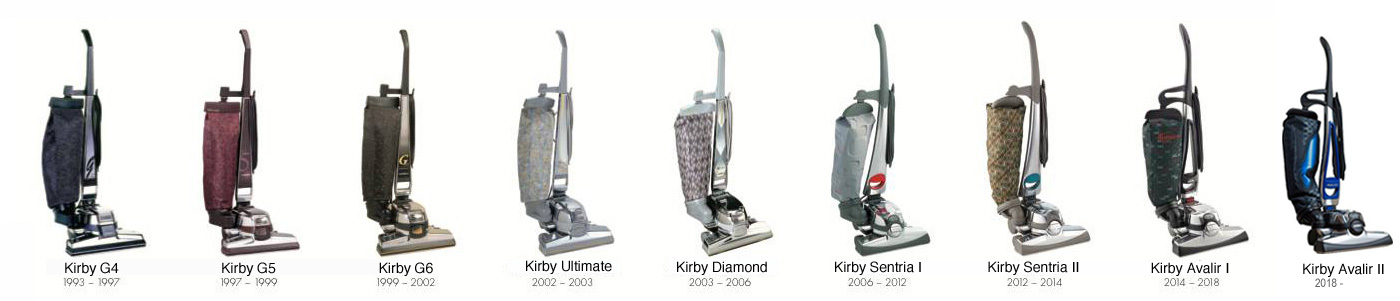
Which Kirby do I have?
Are you curious about exactly which model of vacuum cleaner you own? With this handy guide, you can quickly and easily find out which Kirby you have, so you can always order the right parts and accessories. This overview helps you navigate through the wide range of Kirby models and prevents mistakes when purchasing parts.
Why it is important to know:
In Kirby’s 100-year history, the manufacturer has released no fewer than 28 different models. This can sometimes make it difficult to identify the exact type of vacuum cleaner. Especially since the introduction of the Generation series in 1990, many models are universal, which means that most parts are compatible with multiple models. Nevertheless, there are a few exceptions. That is why it is essential to know exactly which model you have. Only then can you avoid ordering parts that do not fit or limit functionality.
How to identify your model: Which Kirby do I have?
First, it is helpful to check the serial number of your Kirby. This number is usually located on the bottom and side of the machine. In addition, external features such as the design of the housing, the color, and the placement of buttons can help with identification. Furthermore, specific accessories and standard brushes often provide clues about the model. With this information, you can immediately see which Kirby vacuum cleaner you own, allowing you to order the right item for your type of Kirby.
Tips for ordering parts
Once you know which model you have, you can search specifically for the right parts. Pay particular attention to universal parts that are suitable for multiple generations, but always check for exceptions. Using original or compatible parts ensures that your Kirby vacuum cleaner continues to perform optimally and significantly extends its service life.